

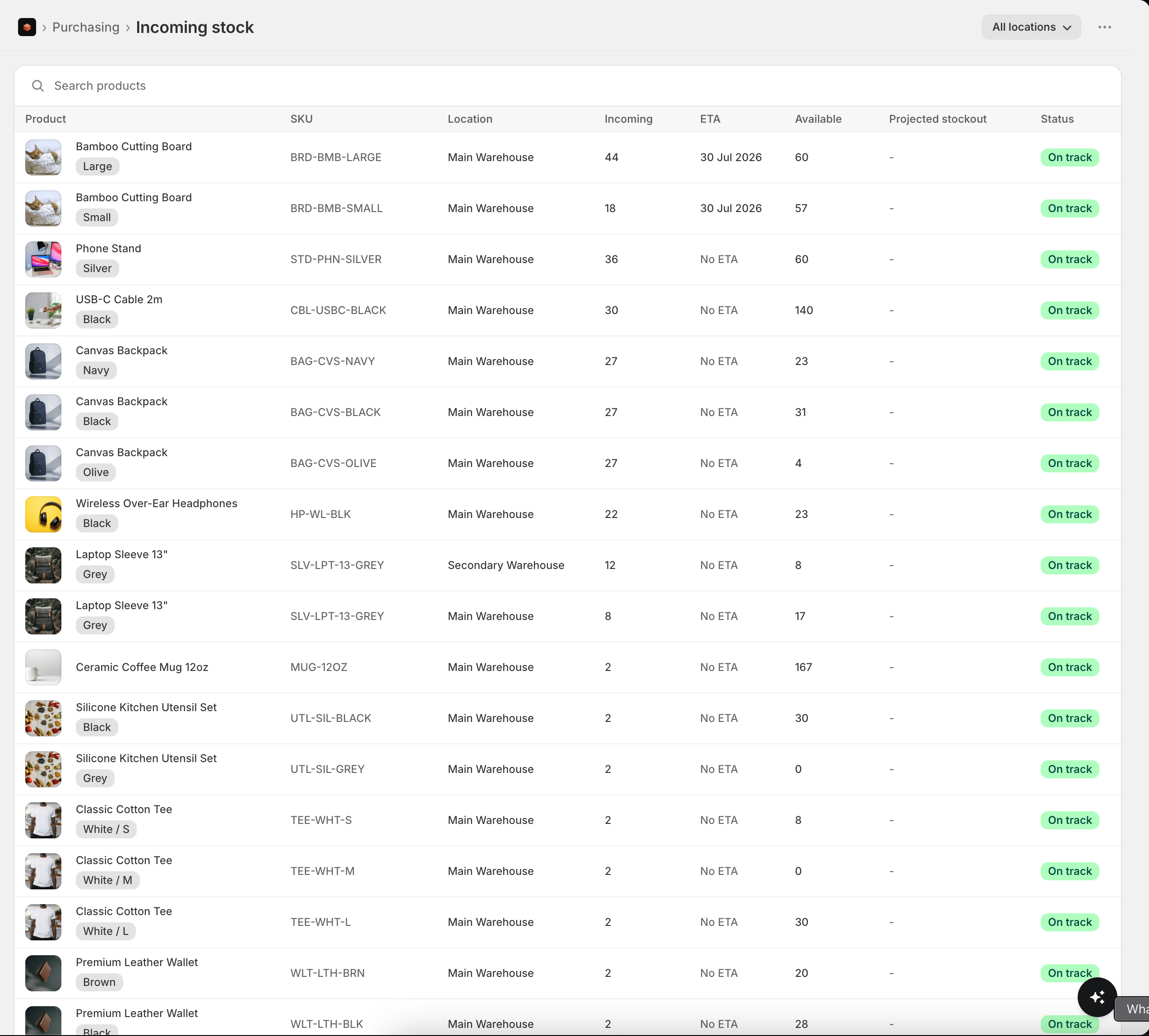
Incoming Stock lists every tracked product with units on their way, so you can see what’s coming and whether it will land in time. Open it from Purchasing → Incoming stock. Incoming stock comes from your purchase order shipments and Shopify inventory transfers that are marked in transit. The arrival date is read from the shipment’s tracking when it’s set. Key columns: product, variant, SKU, location, incoming quantity, ETA (the earliest arrival date), available on hand, projected stockout date, and a status.
  • ETA is the earliest dated arrival across the in-transit shipments carrying that item to the location. Shipments without a tracked arrival date show no ETA.
  • Projected stockout is when the location is forecast to run out at its current sales velocity.
  • Status flags a row at risk when the stock is forecast to run out before the inbound arrives (or before any dated arrival is known), so you can chase the shipment or place a faster order.
Incoming is netted out of your reorder recommendations automatically, so Stockful never tells you to reorder stock that’s already on its way - unless it won’t arrive in time.
Filter by location, vendor, product type or tag, and search to narrow the list, just like the inventory page.