

Inventory list
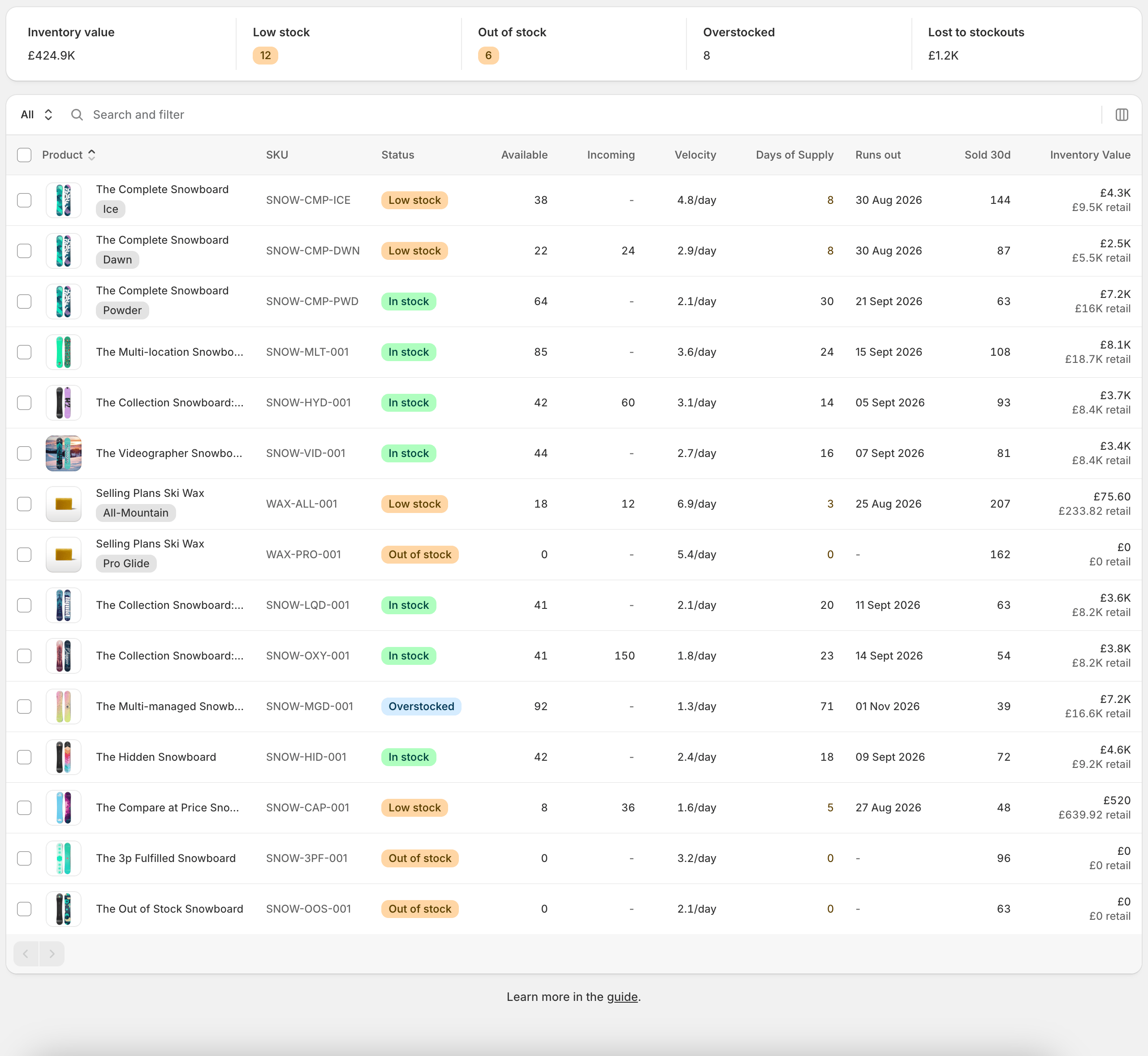
Columns
Every row says whether the SKU is in trouble, not just what is on the shelf:- Product - title, variant and image
- SKU - the variant’s SKU
- Status - in stock, low stock, out of stock or overstocked
- Committed - units allocated to orders that have not shipped yet
- Available - units sellable right now
- On hand - everything physically at the location, including committed, reserved, damaged, safety stock and quality control units
- Incoming - units on their way from a transfer or shipment in transit
- Velocity - units sold per day
- Days of Supply - how long the stock lasts at that rate, highlighted when the SKU is low or out of stock
- Runs out - the date the stock is projected to hit zero
- Order by - the date to place an order so it arrives before that, taking the SKU’s lead time off the runs-out date
- Days OOS - days spent out of stock in the last 30
- Sold - units sold over your velocity calculation period (Settings → Forecasting). The header shows the number of days it covers, so a store on a 90-day period sees Sold 90d. For stores on standard order tracking the window is capped at the 90 days of order history Stockful keeps
- Last sold - the date it last moved
- Inventory Value - what is on the shelf, at cost and at retail
Runs out and Order by are blank for a SKU with no recent sales - there is no demand to project from, which is a different thing from running out today. Order by also needs a lead time, set per SKU or per supplier.
Ordering from the list
Tick the SKUs you want to buy and choose Add to purchase order. Start a new order and Stockful groups them by supplier, prices the lines from the supplier’s cost, and opens the drafts for you to check before sending. Choose one of your open drafts instead and the SKUs go straight onto it. A SKU that is below its reorder point arrives with a suggested quantity. One that is not comes in at a single unit, for you to set on the order. Anything without a primary supplier cannot go on an order, so it is listed separately and skipped. Assign a supplier there and then, and it joins the rest.Tracking from the list
Tick SKUs and choose Stop tracking to take them out of tracking without touching your exclusion rules, or Track on SKUs a rule excludes to track them anyway. The confirmation shows how your tracked SKU count and stock value change first. See Tracking.Views
Save any combination of search, filters and sorting as a view, and it appears in the selector on the left of the search bar. Useful for the checks you repeat: everything low at one warehouse, or every SKU from one supplier.Filtering
Filters help you find exactly what you need:- Location - focus on a single warehouse or store
- Stock status - low stock, out of stock, in stock, overstocked
- Product type, vendor, tags - filter by product attributes
- Tracking status - SKUs that aren’t tracked, and why: excluded by a rule, untracked in Shopify, a bundle, paused at your plan’s limit, or set to never track. The list shows tracked SKUs until you use this filter. See Tracking
Inventory detail
Stock
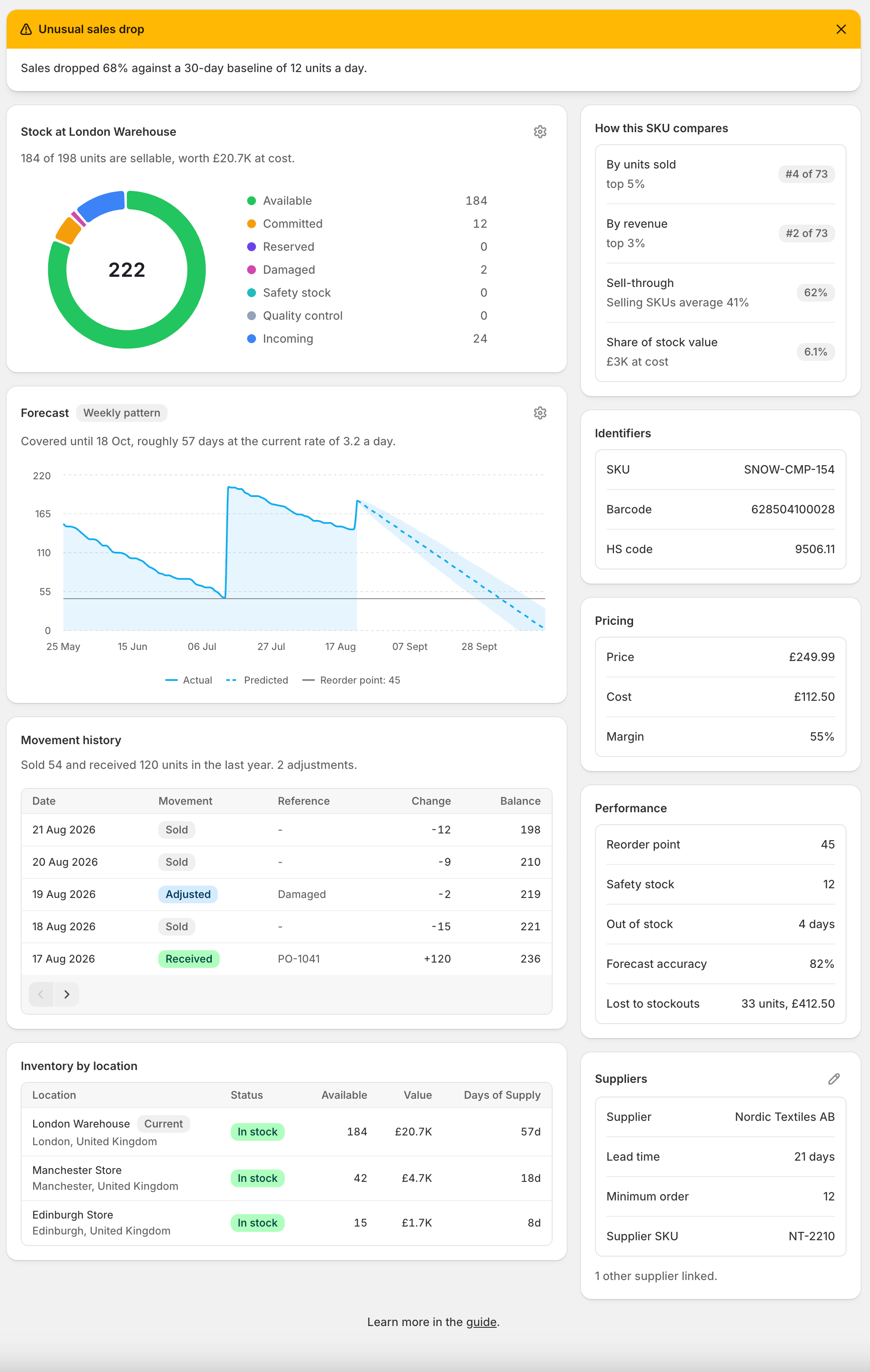
Every quantity Shopify holds for this variant at this location, with the total in the middle of the ring:- Available - sellable right now
- Committed - allocated to orders that have not shipped
- Reserved, damaged, safety stock, quality control - Shopify’s other on-hand states
- Incoming - on its way, shown alongside the rest
Forecast
A projection of this SKU’s stock, with your reorder point marked and a shaded band showing the expected range given how much demand varies. The sentence above it states the conclusion: when it runs out, or how many units to order and by when. The cog controls how much history and projection to show, whether to draw it as a line or an area, and whether to show the band.Movement history
What actually happened to this SKU here: units sold, deliveries received against a purchase order, and stock adjustments, each with the running balance. This is the record the forecast is calculated from. Sales are recorded per day rather than per order. Receipts and adjustments name the document behind them.How this SKU compares
Where this variant sits against the rest of your catalogue - its rank by units sold and by revenue, its sell-through against the average for SKUs that sell, and its share of your total stock value.Reference
Down the side: what this SKU is called elsewhere, what it costs and sells for, and who supplies it. Two costs are shown rather than one, because they are different numbers:- Cost per item - what you have set in Shopify. Always matches what Shopify admin shows.
- Average landed cost - what your receipts say the units actually cost, including freight, duty and any other charges you recorded on the purchase order, plus any cost adjustments added since. Only appears once you have received stock or added a cost adjustment.
Inventory by location
Only shown when this SKU is stocked in more than one place. Click any location to open the same SKU there.Actions
- Adjust stock starts a new adjustment with the item and location already filled in
- Edit details opens SKU, barcode, HS code and cost per item for editing
- Add to purchase order puts this SKU on a new or existing draft
- Transfer stock sends units to another of your locations. Hidden if you only track one.
- Snooze alerts stops this SKU being mentioned in alerts for a set number of days, with an optional reason. It applies to the whole SKU rather than one location, so a SKU you have silenced stays quiet wherever it is stocked. Once snoozed, the same menu offers Resume alerts, and so does the banner at the top of the page.
- Forecast overrides sets this SKU’s lead time, safety stock and other forecasting inputs
- Stop tracking this SKU takes it out of tracking, optionally until a date, without changing your exclusion rules. A SKU set to always track shows an Always tracked badge, and this menu also offers Follow rules again. See Tracking
- View in admin opens the product in Shopify
Editing SKU, barcode, HS code and cost
Edit details writes straight to Shopify, so what you change here is what Shopify shows.- SKU and barcode must be unique across your catalogue. Shopify rejects a duplicate and the message appears on the field.
- HS code is 6 to 13 digits, used for customs declarations on international orders.
- Cost per item is Shopify’s cost. It does not change your average landed cost, which is calculated from receipts.