

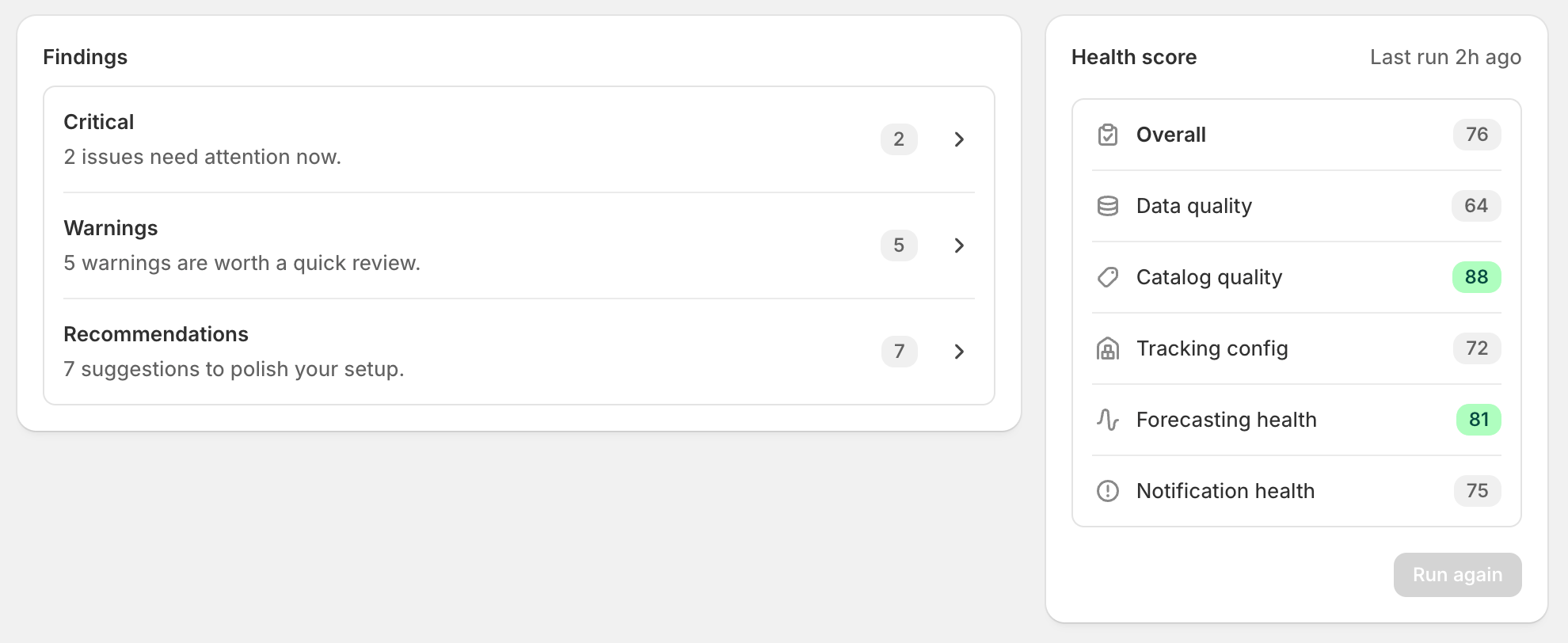
Find it under Settings → Health check. The check is manual - hit Run health check and it scans your shop. You can run it once a day.
What’s audited
The check covers five areas:
Each finding is grouped by category - Critical (needs attention now), Warning (worth a quick review), or Recommendation (polish your setup) - with a short explanation of what was detected and why it matters, plus a fix path.
Fixing findings

- In-app fix - Stockful gives you a focused page (filter pre-applied) to edit the relevant data. The main example is the inventory fix page at
/settings/health-check/inventory-fix, which handles missing cost, missing SKU code, missing barcode, and price-below-cost from one table with inline edits. - Link to a report - for things like slow-moving inventory, the fix button opens the relevant Stockful report so you can dig in.
- Shopify admin deep link - for things Stockful can’t change (product images, base catalog data), the fix button opens the right page in Shopify Admin in a new tab.
Overall score
The check produces a health score (0-100) per area and overall. Scores update each time the check runs. The score is a rough indicator, not a target - some merchants have legitimate reasons for findings that won’t move (e.g. products genuinely without barcodes).How often it runs
The check is manual. Click Run health check to start a scan; the whole run takes about 30 seconds and results appear once it completes. There’s a 24-hour cooldown between runs - once a run completes, Run again is disabled with a tooltip showing when the next run is available. You don’t need to re-run to verify a fix, though: fixes made through Stockful’s own fix pages re-check their finding straight away.Plan availability
Available on all plans.Troubleshooting
- No findings showing - either the check hasn’t been run yet (click Run health check) or your shop genuinely passes everything (unusual but possible for small, well-curated catalogs).
- Finding I fixed is still listed - fixes made through Stockful’s fix pages re-check straight away; changes made elsewhere (in Shopify admin, for example) are picked up on the next run, available daily.
- Finding that doesn’t apply to your shop - Dismiss it.