

Anomaly detection runs on all plans. Turn it off any time under Settings → AI.
What gets flagged
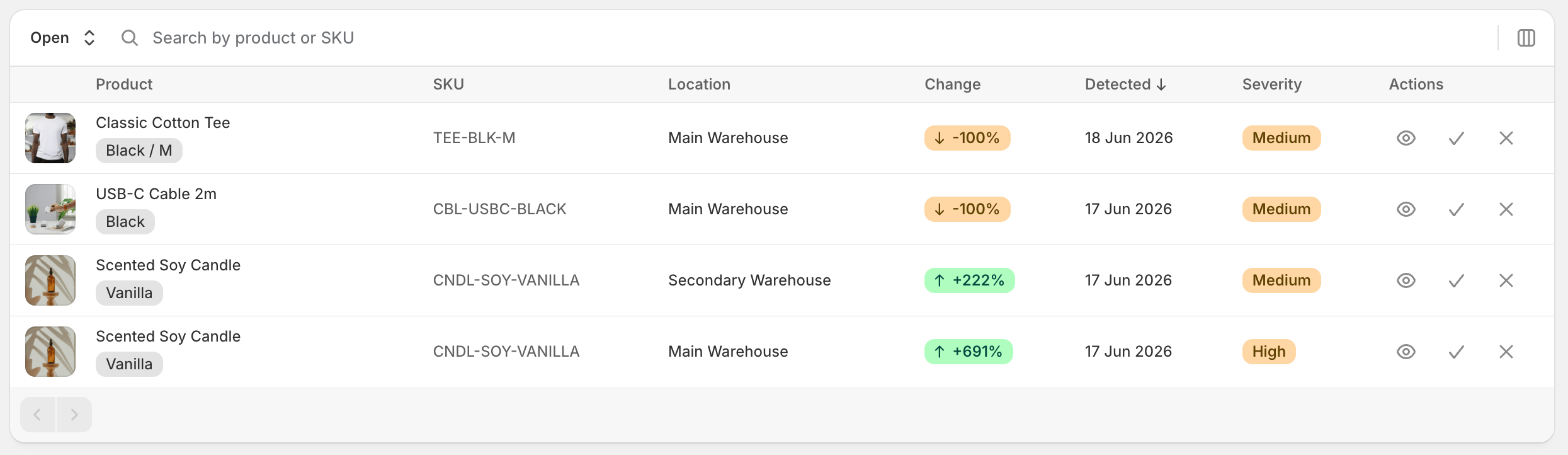
The daily scan compares each SKU’s recent sales against its own baseline (the rolling average + variability) per location. When today’s velocity falls far enough outside the normal band, Stockful records an anomaly. Anomalies have a direction:- Drop - sales fell sharply versus the baseline
- Spike - sales jumped sharply versus the baseline
Anything smaller than the medium threshold is treated as noise and isn’t recorded.
Where you see them
/anomaliespage - the dedicated list, filterable by location, severity, and direction. Each row shows the SKU, the observed vs. baseline numbers, the AI narrative, and a link to the inventory detail page.- Inventory detail page - if the variant you’re looking at has an open anomaly, a banner appears at the top of the page with the narrative and a Dismiss button.
- Home dashboard - a compact card on the home page surfaces the most recent unresolved anomalies so they don’t get lost.
- Slack or email (optional) - set up a Sales spike or drop alert and anomalies are pushed to you like any other alert.
Getting anomalies pushed to you
Anomalies are an alert trigger, so they use the same alerts everything else does - with the cooldown, quiet periods, per-SKU snooze, scope and history that come with them.- Go to Alerts and click Create alert
- Choose the Sales spike or drop trigger
- Set the Severity - High only (default) or Medium and above
- Set the Direction - Spikes and drops (default), Drops only, or Spikes only
- Choose where it goes and how often under Delivery, and which SKUs and locations to watch
Anomaly detection has to be on for these alerts to have anything to send. If Enable Stockful AI is off in Settings → AI, the alert form says so.
Dismissing an anomaly
Anomalies stay open until you dismiss them. Click Dismiss on the inventory-detail banner or use the dismiss action on a row in the anomalies list. Dismissed anomalies are excluded from cards and alerts but stay in your history (filter the list by Dismissed to see them).What the AI narrative does
Anomaly detection itself is statistical - it doesn’t need AI to fire. The AI step writes a short explanation: looks at the SKU’s product type, vendor, recent events (price changes, restocks), and suggests a likely cause (“matches a Black Friday lift across the catalog”, “stockout in the prior week may explain the drop”, etc.). When the model isn’t confident, the narrative says so rather than guessing.Plan availability
Available on all plans.Troubleshooting
- No anomalies for a SKU - the baseline needs enough recent sales history to compute. Brand-new SKUs won’t generate anomalies until they have enough data.
- Too many alerts in Slack - raise the severity threshold to High severity only and/or switch the direction to Drops only.
- Anomalies stopped appearing - check Settings → AI that Enable Stockful AI is on. If it’s off, no scan runs and no anomalies are recorded.