

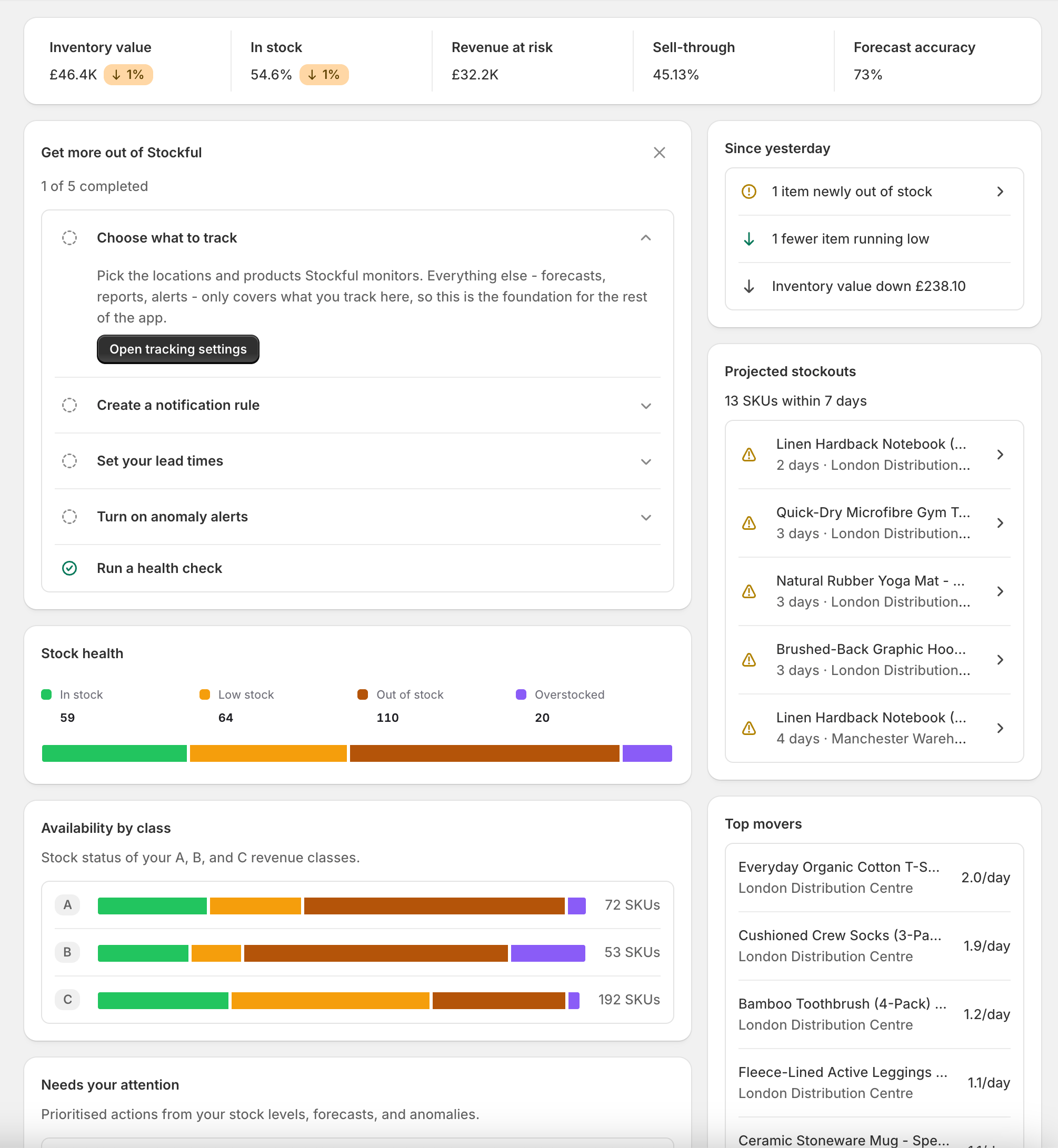
Metrics row
Five clickable stats across the top. Where a trend badge appears, it compares with 7 days earlier - hover it for the exact change.- Inventory value - the cost value of all tracked stock on hand
- In stock - the share of tracked SKUs with stock available right now
- Revenue at risk - estimated revenue lost to out-of-stocks over the last 30 days
- Sell-through - units sold in the last 30 days as a share of units sold plus stock on hand
- Forecast accuracy - how closely Stockful’s demand forecasts matched your actual sales. This builds up as weekly forecasts are graded against real sales, so new shops see a dash until enough weeks have been compared
Setup guide
New and not-fully-set-up shops see a short checklist of the steps that unlock the rest of the app: setting up an alert, setting supplier lead times, turning on AI and anomaly alerts, and running a health check (plus choosing what to track, if you skipped the setup wizard). Steps tick themselves off automatically as you complete them anywhere in the app. If a step doesn’t apply to you, click its circle to mark it complete; dismiss the whole card with the ✕ if you’d rather not see it. Once everything is done the guide disappears on its own.Stock health
A horizontal bar showing how your tracked inventory breaks down:- In Stock - variants with healthy inventory levels
- Low Stock - variants projected to run out in less than your days-of-cover threshold
- Out of Stock - variants with zero available quantity
- Overstocked - variants exceeding your overstock threshold (in days of supply)
Needs your attention
The heart of the dashboard: a prioritised list of everything that needs action, one row per category, each with a count and the worst case spelled out:- Reorders - SKUs at or below their reorder point, with the most urgent one named (“Worst: Black Hoodie, 4 days of stock left with no incoming”)
- Stockouts - out-of-stock SKUs, with the highest-impact one and its estimated lost revenue
- Anomalies - unusual sales spikes or drops detected by Stockful AI
- Transfers - suggested stock moves between your locations
- Clearance - dead stock and the capital it ties up
- Traffic - out-of-stock SKUs shoppers keep landing on, from storefront traffic
30-day trend
One chart with a view picker in its header:- Inventory value - cost and retail value over time, for spotting stock building up or depleting
- Stock issues - the count of out-of-stock and low-stock SKUs over time, for seeing whether problems are trending up or improving