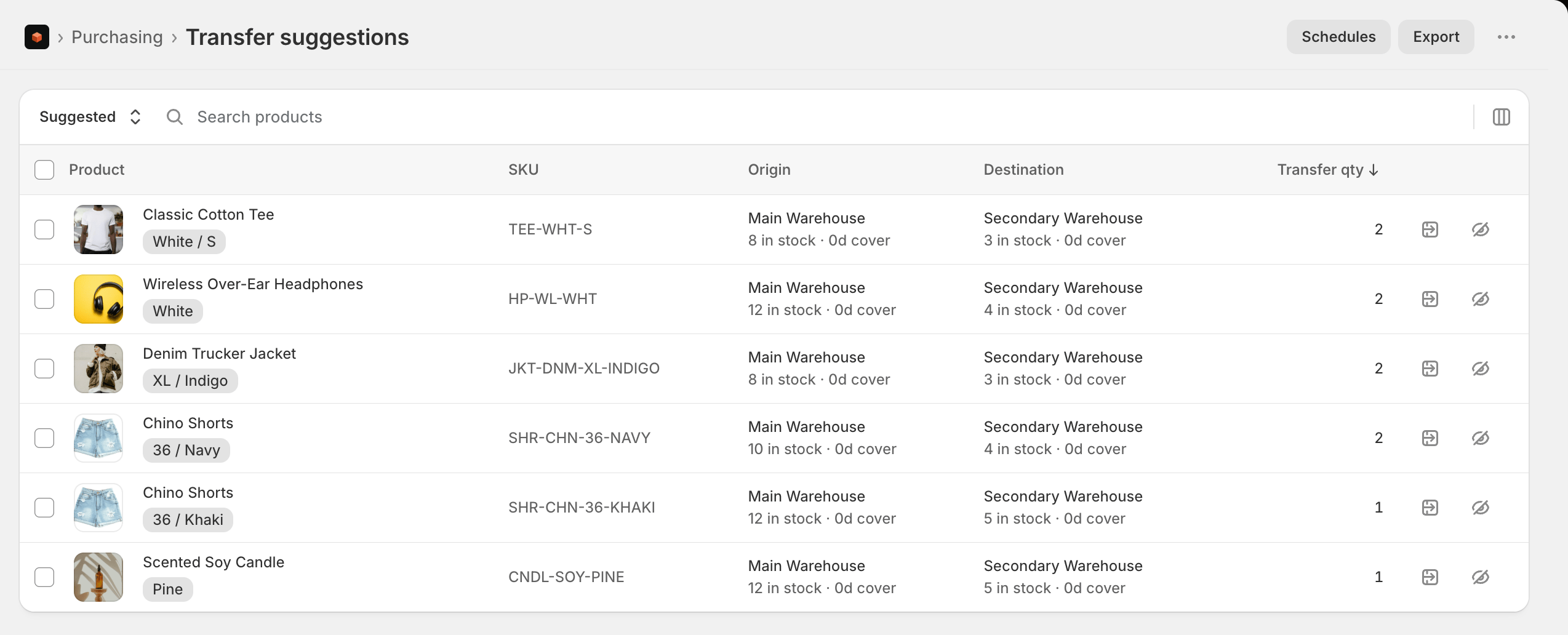
The Transfer Suggestions report spots stock imbalances between your locations - surplus in one, a shortfall in another - and suggests moving units to rebalance. It’s a live, actionable report: you can create the transfer in Shopify and track it through to receipt without leaving Stockful.
Key columns: product, variant, SKU, the Origin and Destination locations (with their current stock and days of cover), and the suggested transfer quantity. On multi-location stores you can filter by Origin and Destination.
Tabs
- Suggested - current rebalance suggestions
- In progress - transfers you’ve created from Stockful, with their live status
- Dismissed - suggestions you’ve hidden
Creating a transfer
Click Create transfer on a row, adjust the quantity if needed (it defaults to the suggested amount), add an optional note, and confirm. Stockful creates the transfer in Shopify as a draft (tagged stockful) and moves the row to the In progress tab.
Stockful never moves stock on its own. A created transfer is a draft - nothing leaves the origin until you mark it ready to ship and ship it in Shopify, exactly as you would for a transfer created by hand.
Dismissing suggestions
If a suggestion isn’t useful, dismiss it (with an optional reason) to hide it. Dismissed suggestions move to the Dismissed tab, where you can restore them. A dismissed suggestion that’s no longer relevant clears itself automatically.
Created transfers are standard Shopify inventory transfers - you manage, mark ready to ship, ship, and receive them in Shopify exactly as you would any other transfer.
Creating transfers uses the write_inventory_transfers permission granted at install. Stockful only ever creates drafts - it never ships or receives on your behalf.