> ## Documentation Index
> Fetch the complete documentation index at: https://docs.stockful.app/llms.txt
> Use this file to discover all available pages before exploring further.
# Forecast settings
> Global defaults for lead time, safety stock, velocity and restock strategy
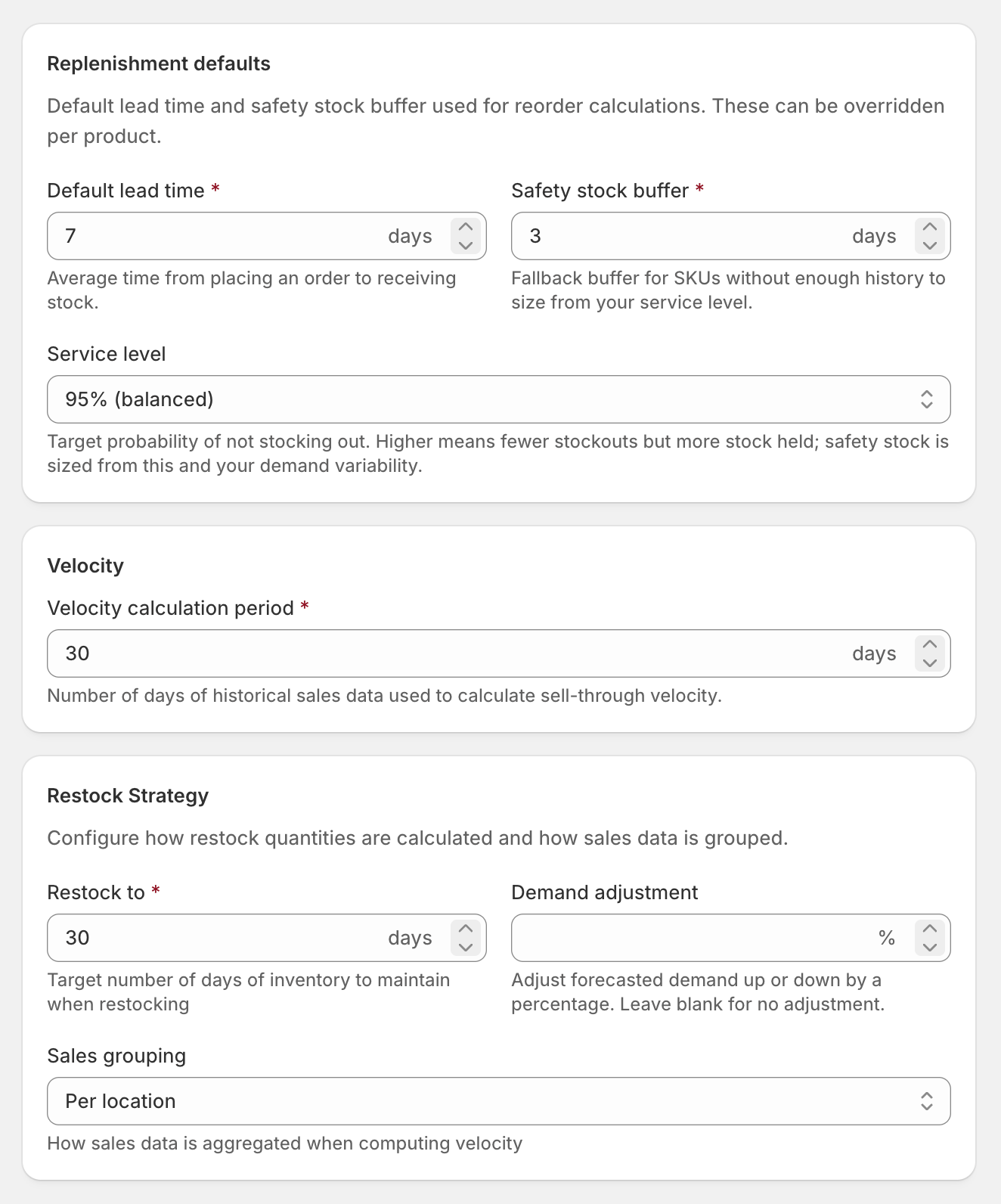
Configure defaults for all SKUs in **Settings → Forecasting**. These apply to every variant unless overridden at the SKU level.
 ## Replenishment
| Setting | What it controls |
| ---------------- | ---------------------------------------------------------------------------------------------------------------------------------- |
| **Lead time** | Days it takes to receive stock from your supplier (0–365, default 7). Longer lead time means earlier reorder recommendations. |
| **Safety stock** | Extra days of buffer stock to keep on hand beyond lead time (0–365, default 3). Protects against demand spikes or shipping delays. |
Where a SKU has enough sales history, Stockful sizes its safety stock **statistically** - from how variable that SKU's demand actually is and your target service level - rather than the flat day-buffer. The day-buffer above is the fallback for new or sparse SKUs.
## Velocity calculation
| Setting | What it controls |
| ------------------- | ------------------------------------------------------------------------------------------------------------------------------------- |
| **Velocity period** | Days of sales history to use when calculating how fast items sell (7–365, default 30). A longer period smooths out short-term spikes. |
## Restock strategy
| Setting | What it controls |
| --------------------- | ------------------------------------------------------------------------------------------------------------------------------------------------------------------------------------------------------------------------------------------------------------------ |
| **Restock-to days** | How many days of supply you want after restocking (1–365, default 30). Higher values mean larger, less frequent orders. |
| **Demand adjustment** | A percentage modifier applied to velocity (-100% to +500%). Use this to account for anticipated seasonal changes - for example, +50% ahead of a busy period. Leave blank for no adjustment. |
| **Sales grouping** | How velocity is calculated for multi-location stores. **Per location** (default) calculates velocity separately at each location. **Combined** aggregates sales across all locations before calculating - useful when stock is fulfilled from a central warehouse. |
When in doubt, set a slightly longer lead time than your actual average. It's better to reorder a few days early than to run out waiting for a shipment.
## Low-stock threshold
The low-stock alert fires when a SKU is projected to run out within **X days** at its current sales velocity (default 7). Because it's days-of-cover rather than a fixed unit count, the same threshold works for slow-movers and fast-movers without re-tuning per SKU.
### Units floor (for new SKUs)
Brand-new SKUs have no velocity history yet, so days-of-cover can't be computed. For those, Stockful falls back to a **units floor** - alert when stock drops to or below this many units (default 5). The floor only matters until the SKU has accumulated enough sales history; after that, the days-of-cover comparison takes over automatically.
Both settings live under **Settings → Tracking**.
## Settings hierarchy
When calculating forecasts, Stockful resolves each setting in order:
1. **SKU override** - if set on the variant, use it
2. **Supplier default** - if the variant is linked to a supplier with a default lead time, use that
3. **Global default** - the value from Settings → Forecasting
This lets you set sensible defaults globally, override at the supplier level for lead times, and fine-tune individual SKUs where needed.
## Replenishment
| Setting | What it controls |
| ---------------- | ---------------------------------------------------------------------------------------------------------------------------------- |
| **Lead time** | Days it takes to receive stock from your supplier (0–365, default 7). Longer lead time means earlier reorder recommendations. |
| **Safety stock** | Extra days of buffer stock to keep on hand beyond lead time (0–365, default 3). Protects against demand spikes or shipping delays. |
Where a SKU has enough sales history, Stockful sizes its safety stock **statistically** - from how variable that SKU's demand actually is and your target service level - rather than the flat day-buffer. The day-buffer above is the fallback for new or sparse SKUs.
## Velocity calculation
| Setting | What it controls |
| ------------------- | ------------------------------------------------------------------------------------------------------------------------------------- |
| **Velocity period** | Days of sales history to use when calculating how fast items sell (7–365, default 30). A longer period smooths out short-term spikes. |
## Restock strategy
| Setting | What it controls |
| --------------------- | ------------------------------------------------------------------------------------------------------------------------------------------------------------------------------------------------------------------------------------------------------------------ |
| **Restock-to days** | How many days of supply you want after restocking (1–365, default 30). Higher values mean larger, less frequent orders. |
| **Demand adjustment** | A percentage modifier applied to velocity (-100% to +500%). Use this to account for anticipated seasonal changes - for example, +50% ahead of a busy period. Leave blank for no adjustment. |
| **Sales grouping** | How velocity is calculated for multi-location stores. **Per location** (default) calculates velocity separately at each location. **Combined** aggregates sales across all locations before calculating - useful when stock is fulfilled from a central warehouse. |
When in doubt, set a slightly longer lead time than your actual average. It's better to reorder a few days early than to run out waiting for a shipment.
## Low-stock threshold
The low-stock alert fires when a SKU is projected to run out within **X days** at its current sales velocity (default 7). Because it's days-of-cover rather than a fixed unit count, the same threshold works for slow-movers and fast-movers without re-tuning per SKU.
### Units floor (for new SKUs)
Brand-new SKUs have no velocity history yet, so days-of-cover can't be computed. For those, Stockful falls back to a **units floor** - alert when stock drops to or below this many units (default 5). The floor only matters until the SKU has accumulated enough sales history; after that, the days-of-cover comparison takes over automatically.
Both settings live under **Settings → Tracking**.
## Settings hierarchy
When calculating forecasts, Stockful resolves each setting in order:
1. **SKU override** - if set on the variant, use it
2. **Supplier default** - if the variant is linked to a supplier with a default lead time, use that
3. **Global default** - the value from Settings → Forecasting
This lets you set sensible defaults globally, override at the supplier level for lead times, and fine-tune individual SKUs where needed.